
Power Apps Feature Management: Using Business Units and Security Groups
June 23, 2026
By: Chad Schadewald
Summary: How can you manage feature access in Power Apps without complex custom logic? By using Dataverse business units, security roles, and Entra ID security groups, you can control feature visibility through native security settings, creating a scalable and easy-to-maintain feature management framework.
As Power Apps solutions grow in complexity, managing access to functionality becomes just as important as building it. While many organizations rely on Dataverse role-based security, feature management is often handled through hardcoded logic, multiple app versions, or complex conditions. These approaches can become difficult to maintain as applications scale across teams, regions, and business functions.
A more sustainable approach is to leverage the security model already built into Dataverse. By using owning business units, security roles, and Entra ID security groups, you can control feature access without adding complexity to your app logic. In this article, we'll look at how to apply this pattern and use Dataverse security as the foundation for scalable, maintainable feature management.
Moving Beyond Basic Role-Based Security
Power Apps gives you a powerful foundation for building flexible, role-aware applications, but many makers stop at basic role-based security. A more dynamic approach is to drive feature visibility directly from Dataverse using owning business units and security groups. By aligning app features with Dataverse security constructs, you can create apps that automatically adapt to the user's organizational role without hardcoding logic or maintaining separate versions of the app. This pattern scales cleanly across environments and keeps governance aligned with your existing Power Platform security model.
Designing a Dataverse-Driven Feature Model
One effective pattern is to create a Dataverse table—for example, "App Features"—that defines each feature or module within your app. Each row represents a feature and includes metadata such as a feature name, description, navigation target, and a flag for whether it should be enabled. The key design choice is assigning each row its own owning business unit. Because Dataverse enforces access at the row level based on business unit hierarchy and assigned security roles, you can use this ownership as the control mechanism. If a user cannot read a row, they effectively cannot "see" that feature in the app.
Aligning Business Units and Security Groups
To make this work, you align security roles and business units with Entra ID (Azure AD) security groups. Users are placed into security groups that correspond to specific business units, and those groups are assigned roles granting read access to the feature records owned by those units. In your Power App, you simply query the App Features table—no complex permission logic required. The app naturally returns only the features the user has access to, and you can bind galleries, menus, or navigation components directly to that filtered dataset. This creates a clean separation between configuration (Dataverse) and presentation (Power Apps), while leveraging the platform's native security trimming.
Why This Approach Scales
The result is a highly maintainable, scalable feature management system inside your app. Adding a new feature becomes as simple as inserting a row and assigning it to the appropriate business unit, rather than editing app logic. Removing access is just as straightforward—update security group membership or role assignments and the feature disappears instantly for the user. This pattern is especially useful in enterprise scenarios where different departments, regions, or roles require tailored functionality, and it keeps your solution aligned with enterprise governance practices without introducing unnecessary complexity in the app itself.
Example Feature Configuration
Structure your table roughly like this:
- Feature Name (Text)
- Enabled (Yes/No)
- Owning Business Unit (system column)
- Optional: ScreenName / NavigationTarget
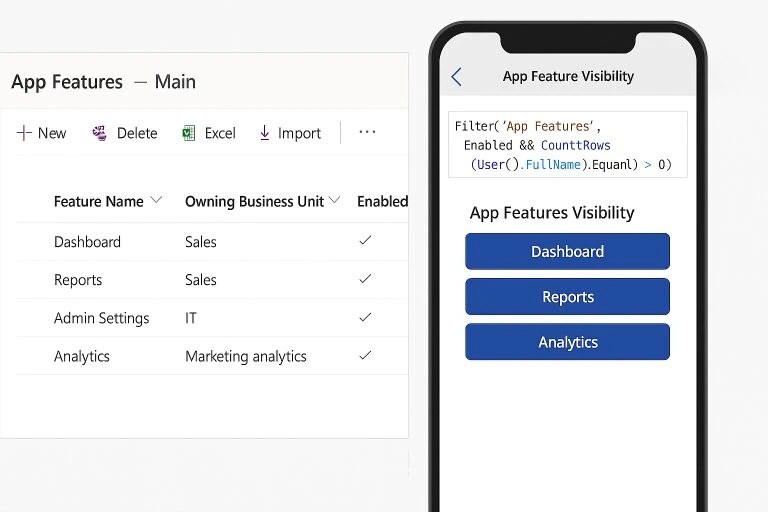
Example Feature Records
- Dashboard → Sales BU → Enabled
- Reports → Sales BU → Enabled
- Admin Settings → IT BU → Enabled
- Analytics → Marketing BU → Enabled
Example image: Dataverse table on the left, Power App on the right.
Final Thoughts
Using owning business units and security groups for feature management turns Dataverse into a configuration engine for your app, rather than just a data store. Instead of embedding feature rules in app logic, you rely on the platform's native security model to determine what each user can access.
This approach reduces complexity, simplifies administration, and keeps access aligned with enterprise governance. It scales cleanly across teams, regions, and roles, and allows new features to be managed through configuration instead of app changes. By adopting this pattern, you can deliver more adaptive Power Apps while keeping security management within Dataverse and the broader Power Platform framework.